Detections
The Detections page is your primary interface for monitoring and managing object detections. This guide covers practical detection operations for effective maritime situational awareness.
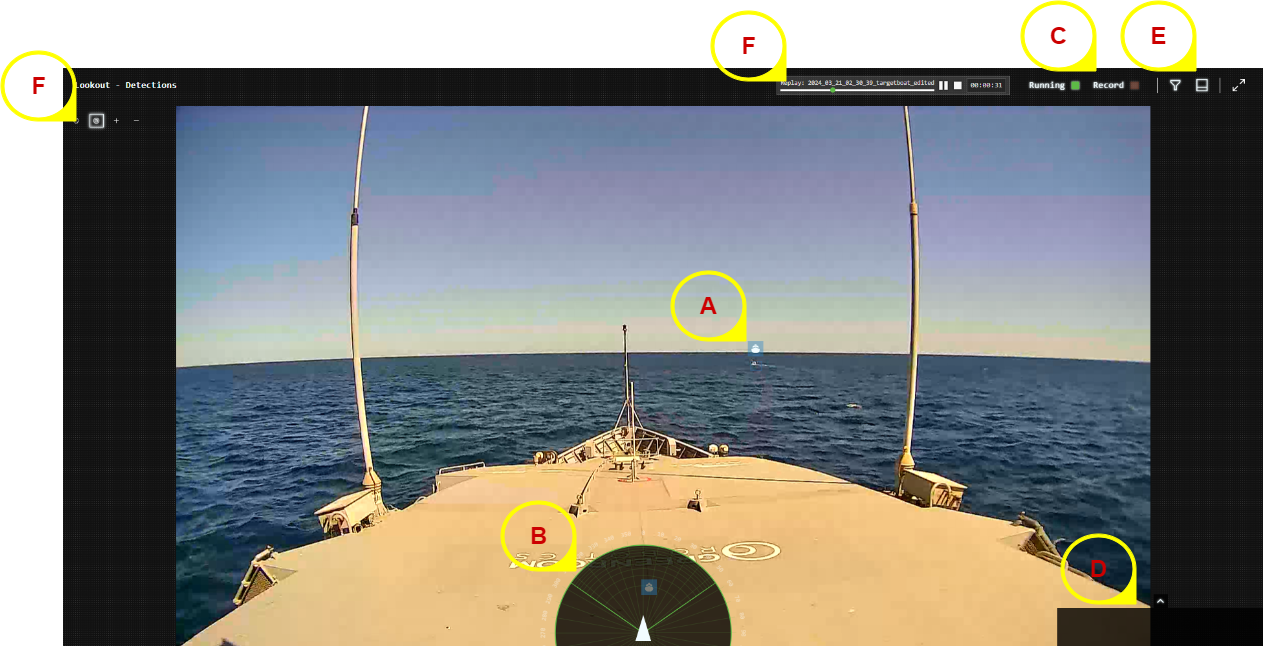
Interface Areas:
- A - Detection Boxes: Real-time object detection overlays
- B - Range/Bearing Plot: Spatial positioning display (Nav version)
- C - System Status: Detection performance and recording controls
- D - Alert History: Recent alert notifications
- E - Filters & Controls: Detection filtering and display options
- F - Navigation Controls: Zoom and view manipulation
Detection Boxes
Understanding Detection Boxes
Each detected object appears as a colored bounding box with information overlay:
- Box Color: Indicates the type of associated alert (Normal, Success, Warning, Critical)
- Existence Probability: Shows existence probability percentage
- Classification Label: Object type (boat, whale, buoy, etc.)
- Track ID: Unique identifier for object tracking
Detection Confidence Interpretation
- High Confidence (>80%): Reliable detection, suitable for automatic systems
- Medium Confidence (50-80%): Good detection, monitor for changes
- Low Confidence (<50%): Uncertain detection, requires verification
Adjust filter thresholds based on conditions - use higher thresholds in rough weather or high-traffic areas to reduce false alarms.
Object Tracking
Track Persistence
- Fresh Tracks: Recently detected objects with current data
- Aged Tracks: Objects not seen recently but still tracked
- Lost Tracks: Objects that have disappeared or moved out of view
"Last Seen" Indicators
Track information shows when objects were last detected:
- Camera: Visual detection from camera feeds
- AIS: Position from vessel transponder data (Nav version)
- Radar: Detection from radar systems (Nav version)
Detection Chips Workflow
Detection chips require enablement by Greenroom engineers. Contact support if this feature is needed.
When enabled, detection chips provide cropped images of detected objects:
- Enable Chips Panel: Add detection chips to your layout
- Monitor New Chips: Fresh detections appear as color images
- Review Aging Chips: Older detections become greyscale
- Verify Classifications: Use chips to confirm automated object identification
Particularly valuable for:
- Marine mammal research and documentation
- Vessel type verification
- Training crew on object identification
Geolocation
Lookout+ Assist:
- Relative bearing only - objects show direction from camera
- All objects displayed at fixed distance
Lookout+ Augment:
- Absolute bearing with ~±2° accuracy
- GPS and compass integration for true positioning
Lookout+ Nav:
- Range and bearing with ~±0.1° accuracy
- Precise positioning using dual-antenna INS
- Objects positioned at calculated real-world distances
Range measurements are most accurate for nearby objects. Accuracy decreases for objects near the horizon due to monocular ranging limitations.
Best Practices
Daily Operations
- Check System Status: Verify all cameras and sensors are operational
- Adjust Filters: Set appropriate confidence thresholds for current conditions
- Monitor Detection Quality: Watch for consistent object sizing and positioning
- Review Alert History: Check for any missed important detections
Environmental Considerations
- Clear Weather: Lower confidence thresholds for maximum sensitivity
- Poor Visibility: Raise thresholds to reduce false alarms from waves/spray
- High Traffic Areas: Use classification filters to focus on relevant objects
- Night Operations: Rely on thermal cameras and adjust sensitivity accordingly
Performance Optimization
- Resource Management: Monitor system load during high-detection periods
- Filter Tuning: Balance between sensitivity and false alarm rates
- Recording Strategy: Use selective recording to manage storage space
Integration with Other Systems
GAMA Integration (Nav Version)
When integrated with GAMA autonomy system:
- Detections automatically feed to collision avoidance
- Filter settings affect GAMA decision-making
- Higher confidence thresholds recommended for autonomous operations
Data Sharing
- Recording for Analysis: Capture challenging detection scenarios
- Model Improvement: Share data with Greenroom for enhanced accuracy
- Crew Training: Use detection examples for maritime awareness education
Related Links
- Detection Concepts: Understanding AI detection technology
- Detection Filters: Comprehensive filtering strategies
- System Alerts: Configure detection-based alerts
- Troubleshooting: Resolve detection issues