Alerts & Notifications
Alerts notify crew of detections requiring immediate attention through sound and visual notifications. This guide covers alert strategy, configuration, and management for effective maritime operations.
Alert Strategy Overview
Effective alerts balance:
- Safety: Critical detections never missed
- Efficiency: Minimal false alarms and alert fatigue
- Operational focus: Alerts match current mission priorities
- Crew workflow: Notifications integrate with watch procedures
Creating and Configuring Alerts
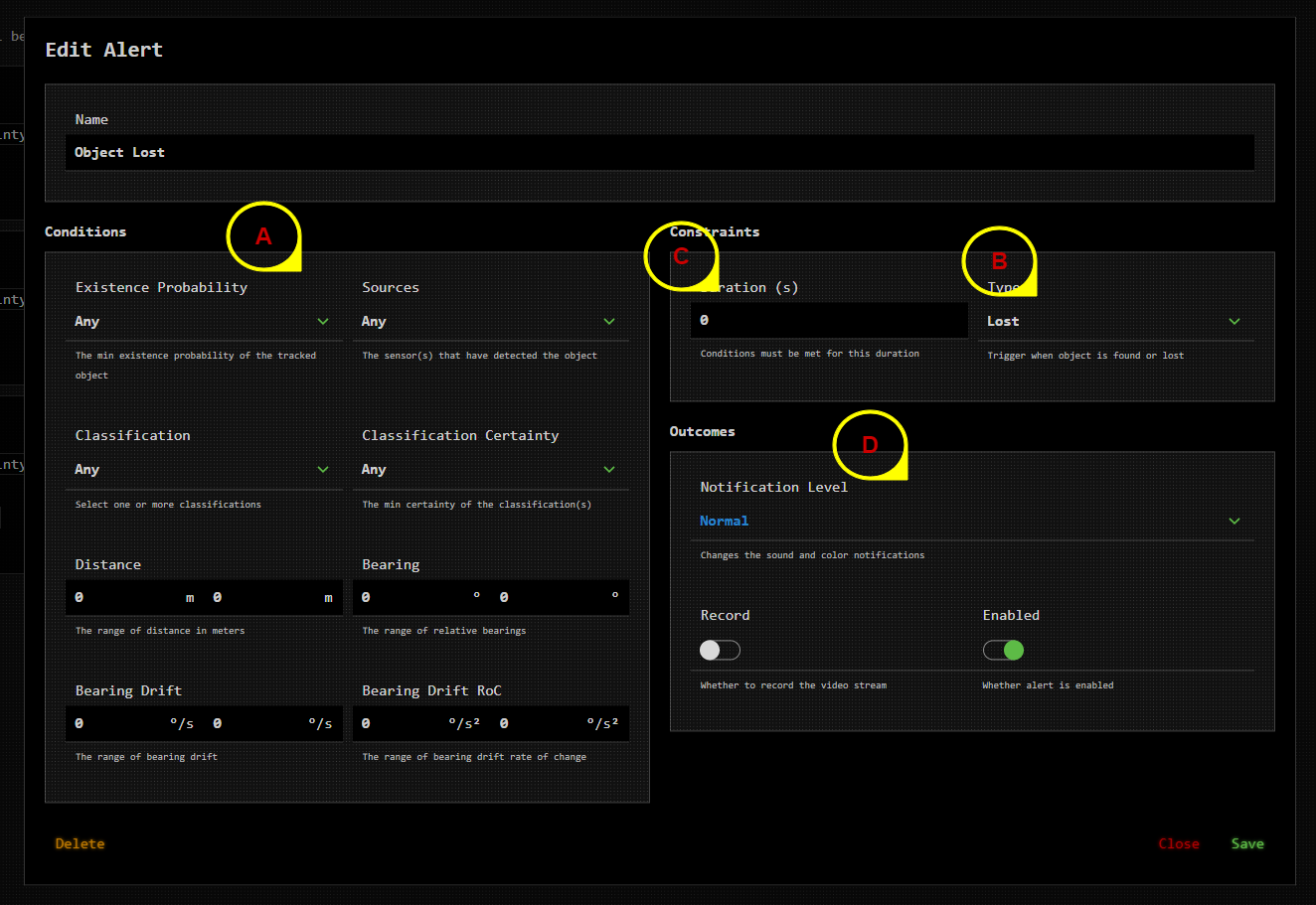
Alert Configuration Areas
- A - Alert Criteria: Define what triggers the alert
- B - Alert Type: When alert activates (object found/lost)
- C - Duration Settings: Timing and persistence requirements
- D - Alert Outcomes: Actions taken when alert triggers
Alert Criteria Configuration
Classification Criteria
Purpose: Specify which object types trigger alerts
Common Configurations:
- All vessels: General collision avoidance
- Large vessels only: Focus on significant traffic
- Marine mammals: Environmental compliance or research
- Navigation markers: Coastal navigation safety
- Unknown objects: Investigate unclassified detections
Operational Example: Port approach alert for "Large Vessel" + "Cargo Ship" classifications
Classification Certainty
Purpose: Set AI confidence threshold for object type identification
Recommended Settings:
- High certainty (>80%): Critical safety alerts to minimize false alarms
- Medium certainty (>60%): General monitoring alerts
- Lower certainty (>40%): Research or comprehensive surveillance
Existence Probability
Purpose: Set AI confidence that object actually exists
Guidelines:
- Collision avoidance: 75-85% to prevent false course changes
- Marine mammal alerts: 50-70% for early detection capability
- Navigation hazard alerts: 80-90% for high confidence warnings
Distance-Based Alerts
Purpose: Alert only for objects within specific range bands
Operational Applications:
- Close approach (0-500m): Immediate collision threat
- Medium range (500m-2km): Early warning for course planning
- Long range (>2km): Traffic monitoring and situational awareness
- Variable by object: Different distances for different threat levels
Bearing-Based Alerts
Purpose: Alert only for objects in specific directions
Common Configurations:
- Dead ahead (±15°): Direct collision course objects
- Port/Starboard approach (±45°): Side approach monitoring
- Crossing traffic (90° ±30°): Right-of-way situation awareness
- Following traffic (180° ±30°): Overtaking vessel monitoring
Bearing Drift Analysis
Purpose: Alert based on object movement patterns
Bearing Drift Applications:
- Constant bearing (±2°): Collision course detection
- Increasing bearing: Objects moving across bow
- Decreasing bearing: Objects falling astern
- Rapid bearing change: Maneuvering vessel alerts
Rate of Change (RoC) Uses:
- Accelerating approach: Vessels increasing speed toward you
- Sudden direction change: Emergency maneuvers or course corrections
- Stable tracking: Vessels maintaining steady course and speed
Alert Types and Timing
Alert Trigger Types
Object Found Alerts:
- Trigger when detection first appears
- Use for collision avoidance and threat detection
- Configure duration to avoid false alarms from momentary detections
Object Lost Alerts:
- Trigger when tracked object disappears
- Useful for monitoring compliance areas
- Important for search and rescue operations
Duration Settings
Purpose: Prevent false alerts from brief detection gaps
Recommended Durations:
- Short (2-5 seconds): High confidence detections in clear conditions
- Medium (5-15 seconds): Standard maritime operations
- Long (>15 seconds): Challenging detection conditions or critical alerts
Alert Outcomes and Actions
Notification Methods
Visual Alerts:
- On-screen notifications with object information
- Alert history panel for review
- Color-coded severity levels
- Flash or persistent display options
Audio Alerts:
- Configurable sound patterns for different alert types
- Volume control for bridge environment
- Distinctive tones for different priority levels
- Silence/acknowledge options
Automated Recording
Purpose: Capture evidence for later analysis
Recording Triggers:
- Pre-alert recording: Start before alert triggers
- Duration recording: Fixed time period from alert
- Manual stop: Crew-controlled recording termination
- Storage management: Automatic cleanup of old recordings
Operational Alert Configurations
Collision Avoidance Alerts
- Classification: All vessel types
- Existence Probability: 80%
- Distance: 0-1000m
- Bearing: Dead ahead ±30°
- Duration: 10 seconds
- Outcome: Audio + visual + recording
Marine Mammal Compliance
- Classification: Whales, dolphins, seals
- Existence Probability: 60%
- Distance: 0-500m
- Bearing: All directions
- Duration: 5 seconds
- Outcome: Visual + recording
Navigation Hazard Detection
- Classification: Unknown objects, debris, floating hazards
- Existence Probability: 70%
- Distance: 0-2000m
- Bearing: Forward quadrant ±90°
- Duration: 15 seconds
- Outcome: Audio + visual + recording
Traffic Management
- Classification: Large vessels, commercial traffic
- Existence Probability: 75%
- Distance: 1000-5000m
- Bearing: All directions
- Duration: 30 seconds
- Outcome: Visual notification only
Alert Management Procedures
Daily Alert Setup
- Review operational area: Configure alerts for expected conditions
- Check environmental factors: Adjust thresholds for weather/visibility
- Test alert systems: Verify audio and visual notifications
- Brief crew: Ensure all operators understand alert meanings and responses
Alert Response Procedures
- Acknowledge alert: Confirm notification received
- Assess situation: Use detection information to evaluate threat
- Take appropriate action: Navigate, investigate, or monitor as needed
- Document if required: Record significant alerts for logs or reports
Alert Tuning and Optimization
Monitor for:
- High false alarm rates: Increase certainty thresholds or add filters
- Missed critical detections: Lower thresholds or broaden criteria
- Alert fatigue: Reduce notification frequency for non-critical alerts
- Crew feedback: Adjust based on operational experience
Integration with Other Systems
Filter Coordination
Ensure alert criteria align with detection filter settings:
- Alert objects must pass filters: Configure filters to show alert-triggering objects
- Threshold consistency: Match alert and filter certainty levels
- Classification alignment: Enable relevant object types in both systems
Recording Integration
Coordinate alerts with recording strategy:
- Storage capacity: Balance alert recording with available space
- Priority recording: Ensure critical alerts always trigger recording
- Review workflow: Establish procedures for reviewing alert-triggered recordings
Watch Procedures
Integrate alerts with bridge procedures:
- Handover information: Include alert configuration in watch relief
- Response protocols: Establish standard responses for different alert types
- Documentation: Record alert activity in appropriate logs
Alert Issues
Common alert problems:
- Too many false alerts: Increase existence probability thresholds or add classification filters
- Missing detections: Lower certainty thresholds and broaden classification criteria
- Audio issues: Check volume settings and test alert tones
See Alert System Troubleshooting for detailed resolution steps.
Quick Reference
Alert Types by Operational Scenario
| Scenario | Primary Alerts | Thresholds | Special Considerations |
|---|---|---|---|
| Open Ocean Transit | Vessel collision, large mammals | 75% certainty, 1km range | Long-range awareness |
| Coastal Navigation | All vessels, navigation markers | 80% certainty, 2km range | Include marker detection |
| Port Approach | Commercial traffic, pilot boats | 85% certainty, 500m range | High confidence only |
| Marine Protected Area | All marine life, small boats | 60% certainty, 1km range | High sensitivity |
| Harbor Operations | Large vessels, harbor craft | 80% certainty, 300m range | Focus on significant traffic |
Related Documentation
- Detection Filters: Coordinating alerts with filtering
- Managing Detections: Understanding detection display
- System Health: Monitoring alert system status
- Recordings: Managing alert-triggered recordings