Detection Chips
Detection chips are small cropped images of detected objects that provide visual confirmation of automated detections.
Detection chips is currently a beta feature that must be enabled by Greenroom engineers. Contact Greenroom support to enable this capability on your system.
What are Detection Chips?
Automatically generated image segments showing detected objects with:
- Object cropping from the full video frame
- Associated metadata including confidence scores and timestamps
- Multiple camera views when available
Detection chips are particularly valuable for marine mammal research and vessel verification.
User Interface Integration
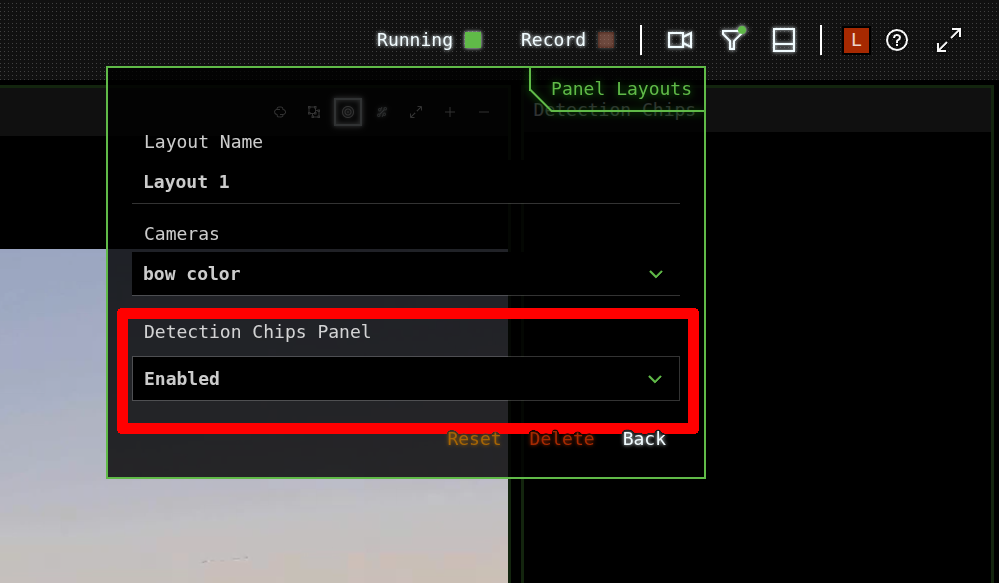
Enabling Detection Chips
To view detection chips in the Lookout+ interface:
- Edit Panel Layout: Access the UI customization options
- Enable Detection Chips Panel: Add the panel to your workspace layout
- Position Panel: Place the panel for optimal workflow integration
Using the Detection Chips Panel
The detection chips panel displays objects in chronological order:
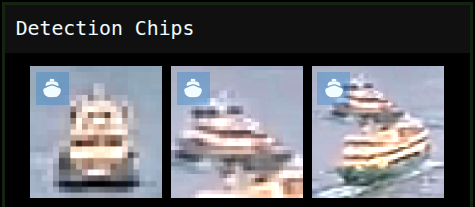
Panel Organization
- Newest First: Most recent detections appear at the top
- Chronological Order: Older detections scroll down over time
- Visual Aging: Older chips become greyscaled to indicate age
- Automatic Cleanup: Very old chips disappear automatically to maintain performance
Chip Lifecycle
Chips automatically age and are removed from the display over time:
- Fresh: Full color display
- Aging: Greyscale conversion
- Expired: Automatic removal
Configuration
Key settings include:
- Detection Thresholds: Minimum confidence levels for chip generation
- Retention Time: How long chips remain visible
- Camera Sources: Which cameras generate chips
- Monitor Regularly: Check the chips panel frequently during operations
- Adjust Thresholds: Fine-tune settings based on your operational environment
- Provide Feedback: Report classification accuracy to help improve system performance
- Use for Training: Utilize chips to train crew members on object identification
Detection chips consume additional computational resources and display memory. In high-detection environments, consider adjusting sensitivity settings to maintain optimal system performance.