Camera Pipeline Configuration
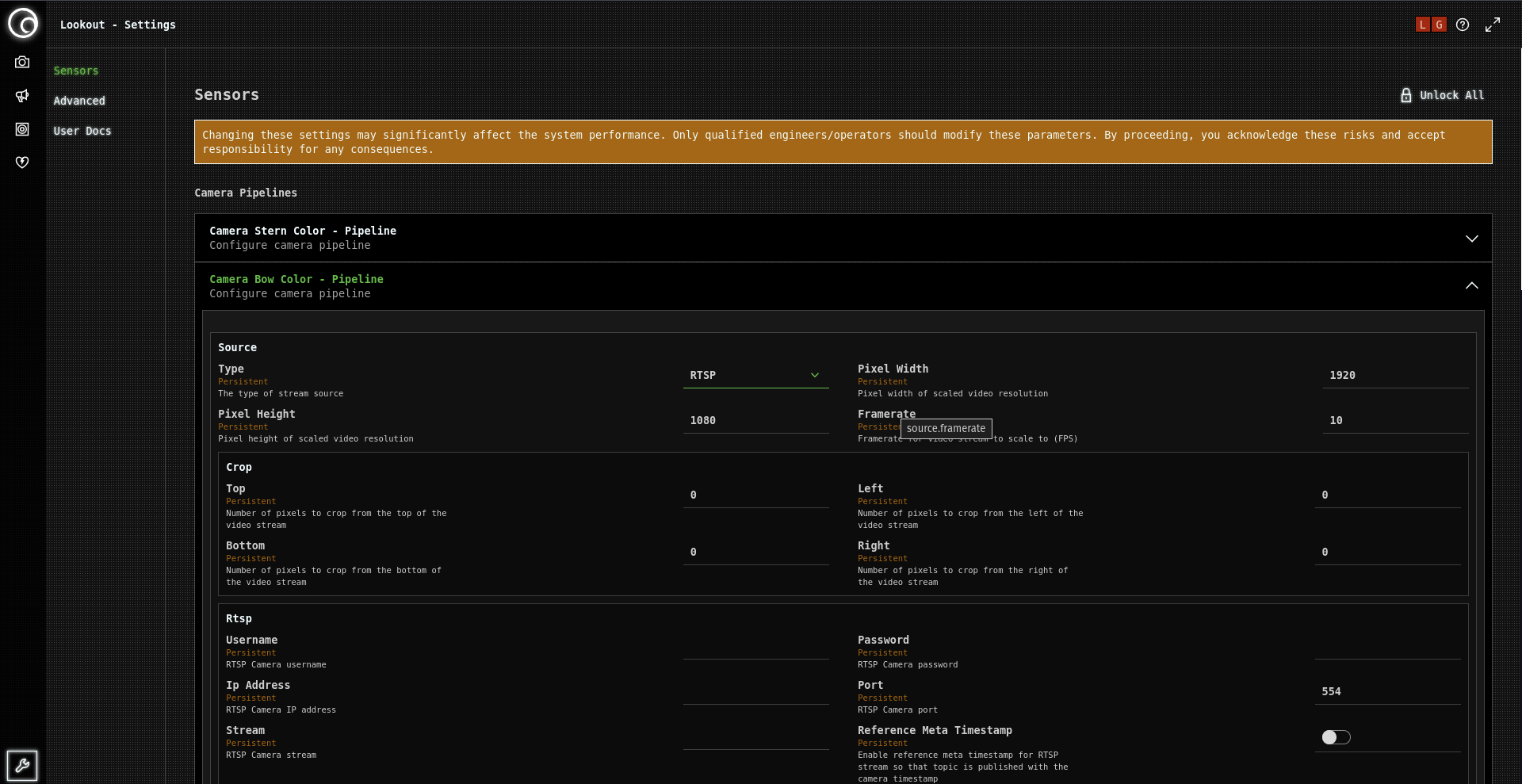
Camera pipeline configuration manages the data flow from cameras through processing to detection output. While Greenroom pre-configures all pipelines during installation, certain situations may require user intervention.
All camera pipelines are set up by Greenroom engineers during system installation. Most users will never need to modify these configurations.
Pipeline Overview
What is a Camera Pipeline?
A camera pipeline is the complete data path from camera to detection:
- Video Capture: Camera streams (RTSP, USB, or network)
- Image Processing: Format conversion and preprocessing
- AI Detection: Neural network object detection
- Data Output: Detection results and metadata
- User Interface: Display and interaction components
Pipeline Components
Streaming Sources:
- RTSP IP cameras (most common)
- USB/V4L local cameras
- ROS/DDS camera feeds
- WebRTC browser streams
Processing Elements:
- Format conversion (H.264, MJPEG, etc.)
- Resolution scaling and optimization
- Detection model integration
- Result processing and filtering
When User Intervention is Needed
Network Configuration Changes
IP Address Changes: Camera IP addresses may change due to:
- Network infrastructure updates
- DHCP lease renewals
- Camera hardware replacement
- Network security reconfigurations
Network Routing Updates:
- VLAN changes affecting camera access
- Firewall rule modifications
- Network switch replacements
- Subnet reconfigurations
Hardware Replacement
Camera Hardware:
- Camera unit replacement with different IP
- Upgrade to new camera models
- Repair or warranty replacements
- Addition of new camera positions
Network Infrastructure:
- Network switch replacements
- Router or gateway changes
- Cable infrastructure updates
- Power over Ethernet (PoE) modifications
Common Configuration Tasks
Updating Camera IP Addresses
Access Pipeline Configuration:
- Navigate to Lookout+ Interface → Advanced Settings
- Select Camera Configuration or Pipeline Settings
- Locate the affected camera pipeline
- Update RTSP URL with new IP address
RTSP URL Format:
rtsp://[username]:[password]@[new_ip_address]:[port]/[stream_path]
Example:
rtsp://admin:password@192.168.1.100:554/stream1
Network Credentials
Authentication Updates:
- Change camera login credentials in pipeline settings
- Update network authentication certificates
- Modify VLAN or network access credentials
Security Configuration:
- Update encrypted connection settings
- Modify firewall access rules (coordinate with IT)
- Change network security protocols
Troubleshooting Common Issues
No Video Feed
Diagnostic Steps:
- Network Connectivity: Ping camera IP address
- RTSP Stream: Test stream URL in VLC media player
- Authentication: Verify username/password
- Firewall: Check network access permissions
- Camera Status: Confirm camera is powered and operational
Resolution Approaches:
- Network Issues: Coordinate with IT support
- Camera Problems: Contact camera manufacturer or Greenroom
- Configuration Errors: Restore from backup or contact Greenroom
Poor Video Quality
Common Causes:
- Bandwidth Limitations: Network congestion affecting stream quality
- Camera Settings: Resolution or framerate misconfiguration
- Processing Load: System resources overwhelmed
- Compression Issues: Codec or encoding problems
Immediate Actions:
- Check network utilization and bandwidth
- Verify camera configuration hasn't changed
- Monitor system resource usage
- Contact Greenroom for optimization assistance
Detection Performance Issues
Pipeline-Related Factors:
- Stream Quality: Poor video affecting AI detection accuracy
- Timing Issues: Frame rate or synchronization problems
- Format Compatibility: Video format not optimized for processing
- Resource Allocation: Processing power insufficient for pipeline load
Diagnostic Approach:
- Monitor detection confidence scores
- Check video stream quality and consistency
- Verify system resource availability
- Contact Greenroom for performance analysis
Configuration Best Practices
Documentation
Configuration Records:
- Document all pipeline settings before changes
- Record original RTSP URLs and credentials
- Note network configuration dependencies
- Maintain camera hardware specifications
Change Management:
- Test changes on single camera before applying broadly
- Maintain backup configurations
- Document all modifications with timestamps
- Coordinate with IT and Greenroom teams
Testing and Validation
Configuration Testing:
- Stream Verification: Confirm video feed quality and consistency
- Detection Testing: Verify AI detection continues to function properly
- Performance Monitoring: Check for any degradation in system performance
- Cross-Camera Validation: Ensure changes don't affect other pipelines
Performance Monitoring:
- Watch for consistent video quality
- Monitor detection accuracy and response times
- Check system resource utilization
- Verify network stability and throughput
Emergency Procedures
Configuration Rollback:
- Keep backup configurations readily available
- Document rollback procedures for quick recovery
- Test rollback process during maintenance windows
- Ensure Greenroom contact information is current
Escalation Process:
- Initial Diagnosis: Basic troubleshooting and verification
- Internal IT Support: Network and infrastructure issues
- Greenroom Support: Pipeline configuration and optimization
- Emergency Contact: Critical system failures requiring immediate attention
Support Scenarios
Contact Greenroom For
Complex Configuration Changes:
- Multiple camera pipeline modifications
- Integration with new camera hardware
- Performance optimization requirements
- Advanced processing feature configuration
System Integration Issues:
- Pipeline integration with external systems
- Multi-sensor data fusion configuration
- Custom processing requirements
- Advanced network configuration needs
Performance Optimization:
- System resource optimization
- Detection accuracy improvements
- Custom pipeline development
- Advanced troubleshooting and diagnosis
Camera pipeline configurations are critical to system operation. Always backup current settings before making changes, and contact Greenroom support when uncertain about modifications.
Schedule pipeline configuration reviews during planned maintenance windows. This allows for thorough testing and validation without impacting operational requirements.